Anspire MCP Server帮助文档
概述
本文档介绍如何在Cherry Studio中连接和使用Anspire MCP提供的两大核心AI工具:
1. 网络搜索工具 - 实时联网信息检索能力
2.多轮重写工具 - 支持上下文保持的智能文本改写
前提条件
- 已安装 Cherry Studio 最新版本
- 拥有有效的安思派AI服务平台的 Api key (安思派AI服务平台)
- 确保网络连接正常
MCP Server Endpoint
链接方式(示例)
Dify 1.x版本
插件
MCP SSE/StreamableHTTP

授权
{"anspire_mcp": {"url":"http://plugin.anspire.cn/mcp","headers":{"Authorization": "Bearer sk-xxxxxxxxxxxxx"},"timeout":50,"sse_read_timeout":50}}
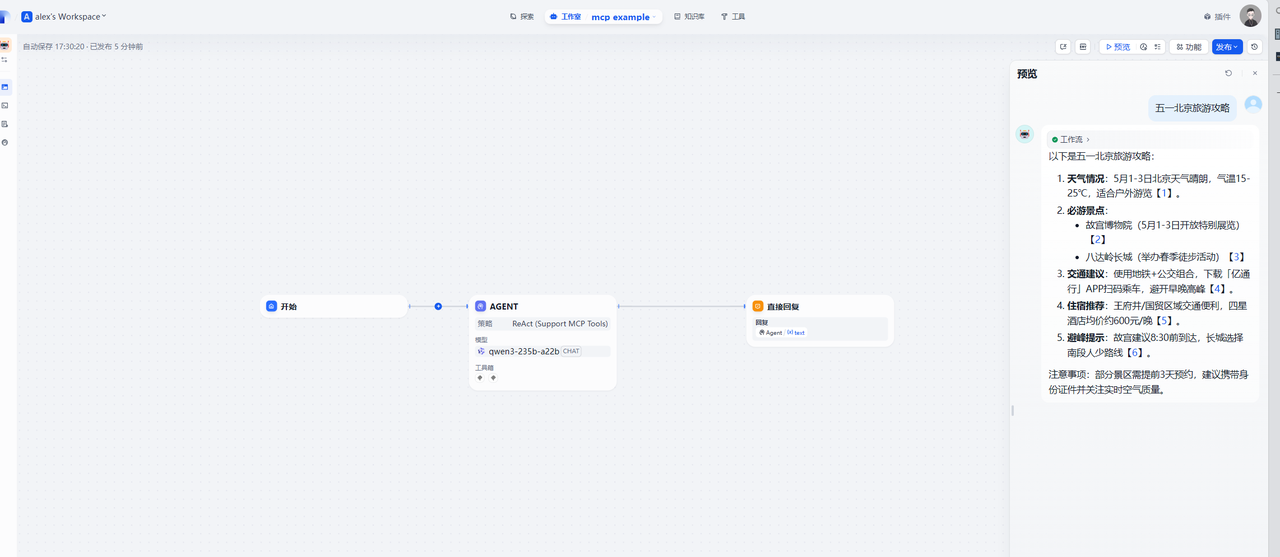
ChatFlow-Agent节点
Agent节点配置
AGENT策略
ReAct(Support MCP Tools)
模型
qwen3-235b-a22b
工具列表
添加插件
MCP 服务配置
{"anspire_mcp": {"url": "https://plugin.anspire.cn/mcp","headers": { "Authorization": "Bearer sk-xxxxxxxxxxxxx"}, "timeout": 5,"sse_read_timeout": 300}}
你是一个智能助手请根据工具结果回答问题,并严格遵守格式要求:
1. 我会首先解析JSON格式的参考信息,仔细分析results属性的内容
2. 对于时效性强的信息(如天气),只选用当天数据;新闻则选用最近3天内的信息
3. 每个回答段落必须包含正确格式的标注,如【<a href="URL" target="_blank">编号</a>】
4. 所有引用内容都会标明具体来源
5. 回答将分段落呈现,段落清晰,避免大段文字堆砌
6. 优先选用匹配度最高(score值最高)的内容
7. 确保每个标注都能正确跳转到对应URL
Chatflow流程及效果
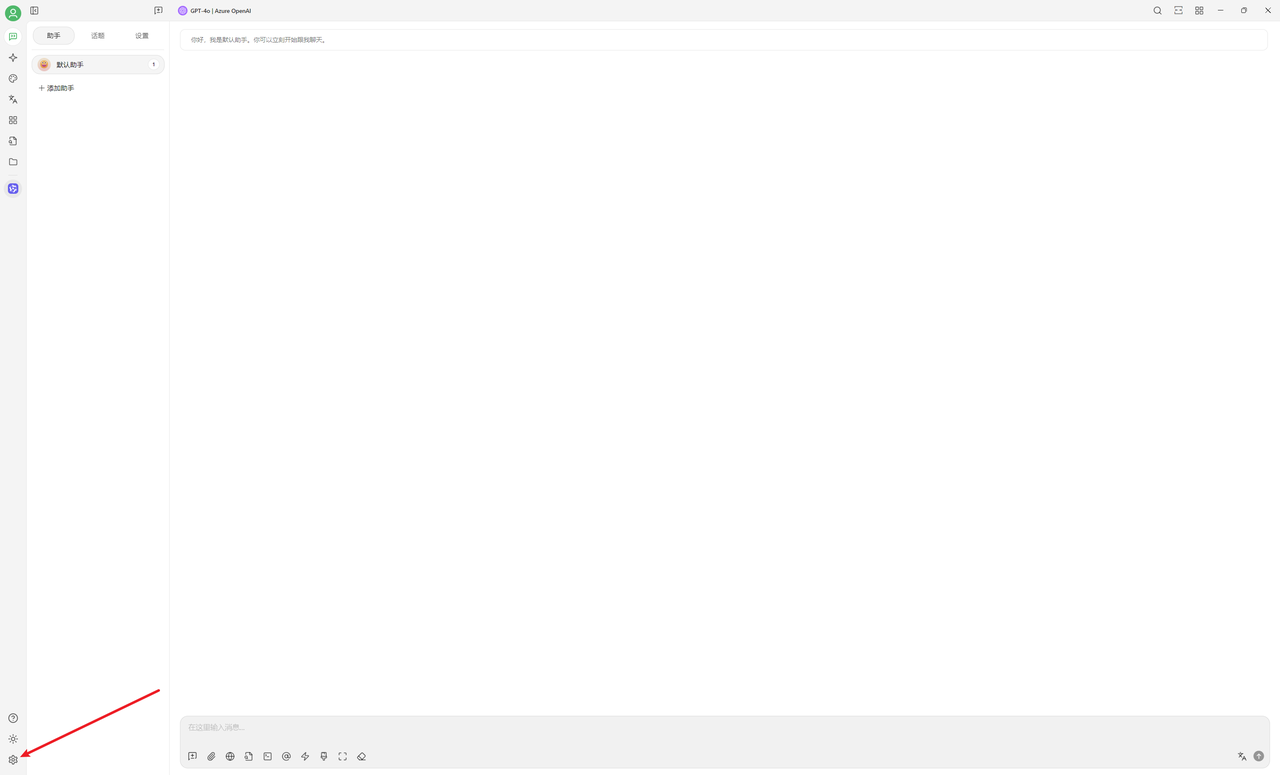
Cherry Studio 客户端
1. 打开应用点击左下角设置按钮
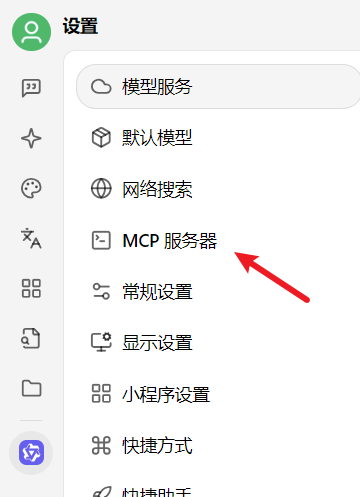
2. 设置菜单:MCP 服务器
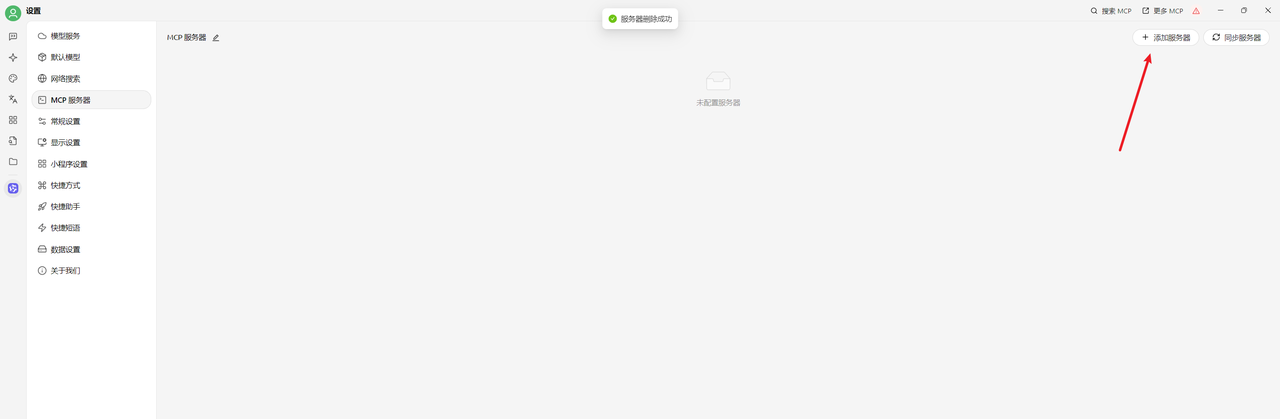
3. 添加
4. 输入名称
类型:服务器发送事件(sse)
URL:https://plugin.anspire.cn/mcp
请求头:Authorization=Bearer sk-xxxxxxxx
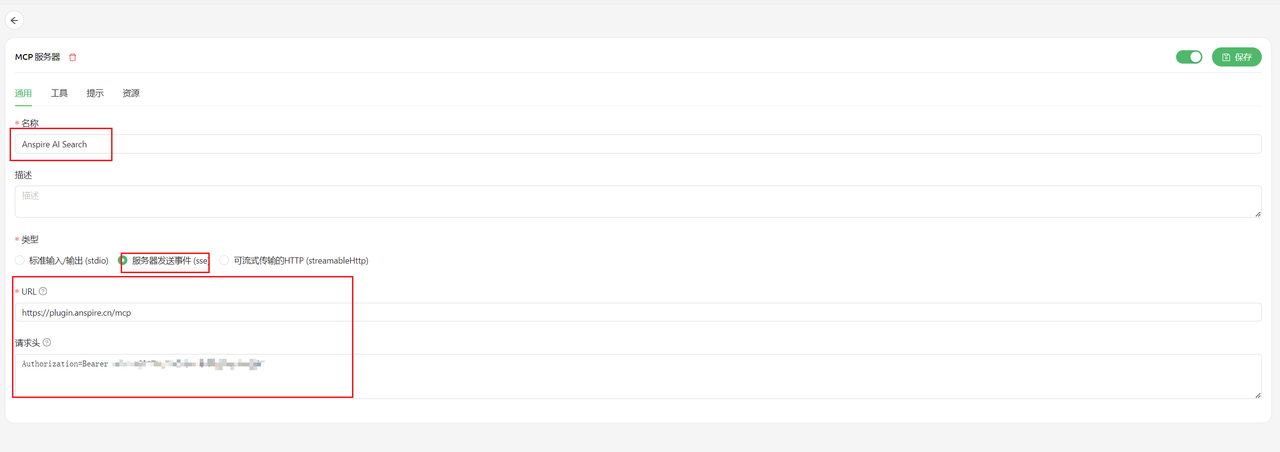
5. 可用工具列表(只用特定的工具时可以关闭其他工具)

6. 助手使用MCP
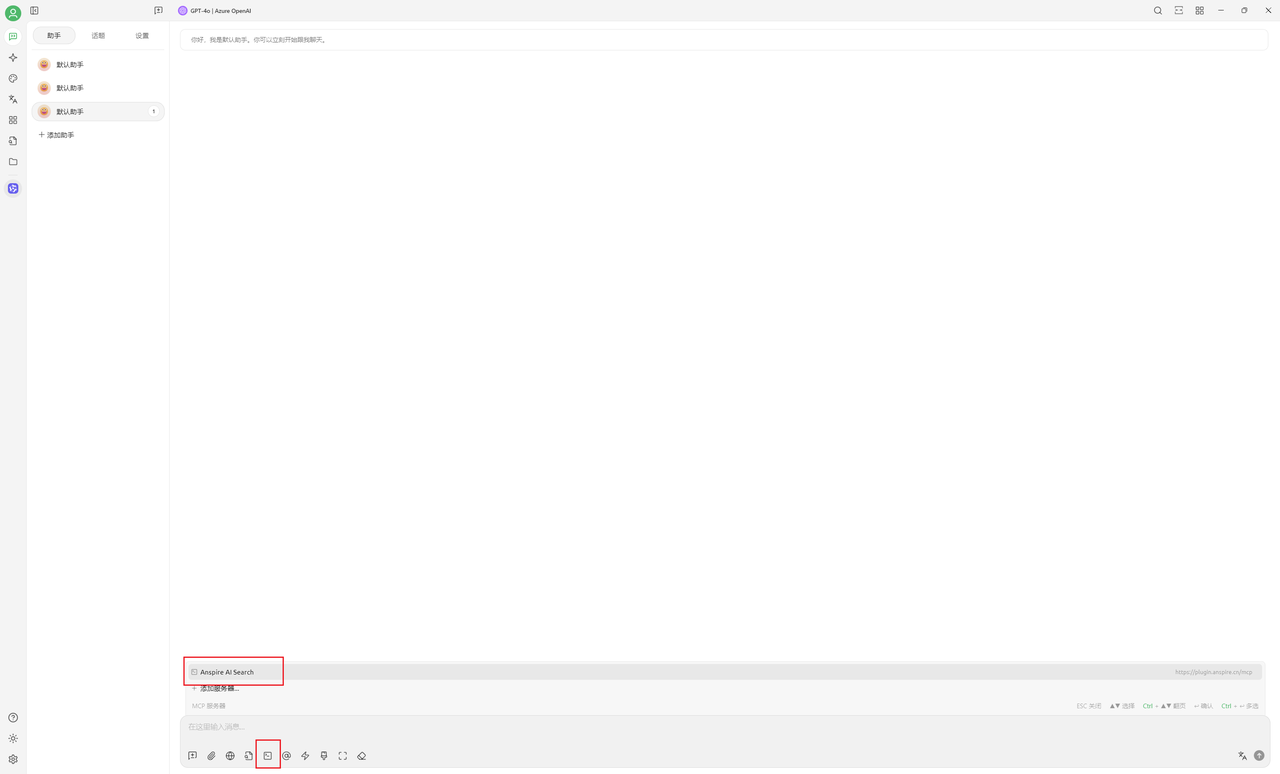
7. 效果
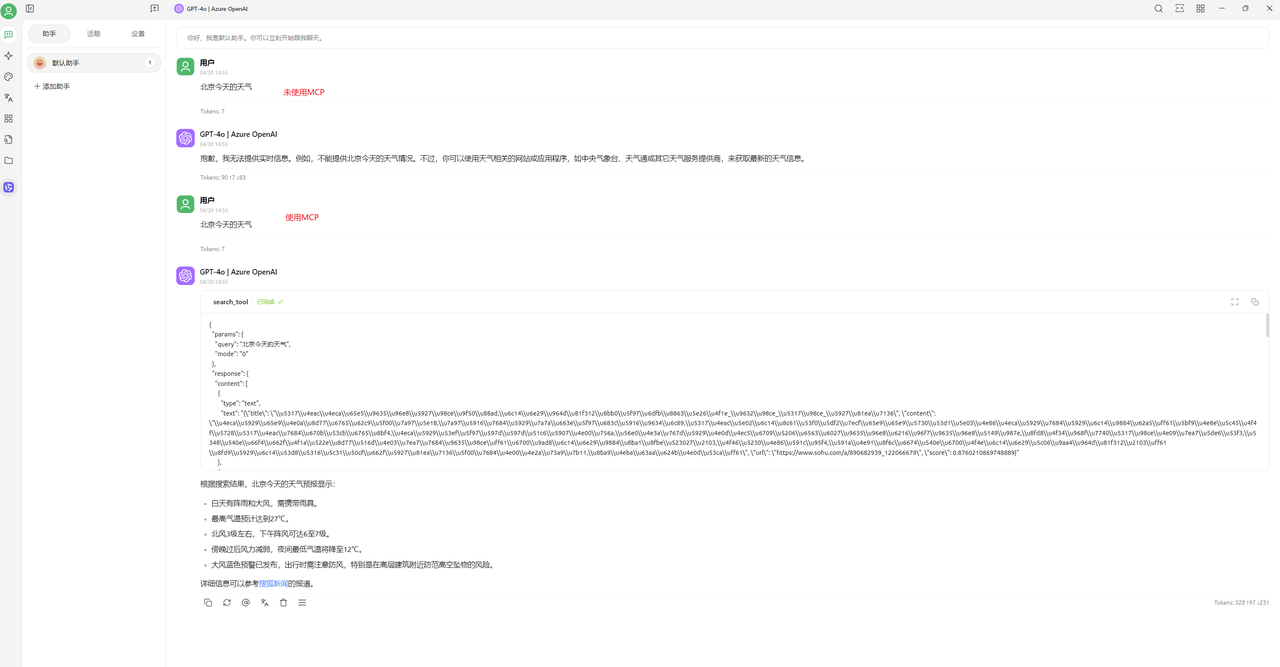
Python Development Example
import asyncio
import logging
from typing import Optional
from contextlib import AsyncExitStack
from mcp import ClientSession, StdioServerParameters
from mcp.client.stdio import stdio_client
from mcp.client.sse import sse_client
from openai import AzureOpenAI
import json
from dotenv import load_dotenv

logging.basicConfig(level=logging.DEBUG)

class MCPClient:
    def __init__(self):
        self.session: Optional[ClientSession] = None
        self.exit_stack = AsyncExitStack()
        self.openai = AzureOpenAI(
            azure_endpoint="https://xxxx-xxxxx.openai.azure.com",
            azure_deployment="gpt-4o",
            api_version="xxxx-xx-xx-preview",
            api_key="xxxxxxxxxxxxxxxxxxx",
        )

    async def connect_to_sse_server(self, server_url: str):
        self._streams_context = sse_client(
            url=server_url,
            headers={"Authorization": "Bearer sk-xxxxxx"},
        )
        streams = await self._streams_context.__aenter__()
        self._session_context = ClientSession(*streams)
        self.session: ClientSession = await self._session_context.__aenter__()
        await self.session.initialize()
        # 列出所有可用的工具
        response = await self.session.list_tools()
        print(response)
        tools = response.tools
        print("工具: ", [tool.name for tool in tools])

    async def connect_to_server(self, server_script_path: str):
        is_python = server_script_path.endswith(".py")
        is_js = server_script_path.endswith(".js")
        if not (is_python or is_js):
            raise ValueError("Server script must be a Python or JavaScript file.")
        command = "python" if is_python else "node"
        server_params = StdioServerParameters(
            command=command, args=[server_script_path], env=None
        )
        stdio_transport = await self.exit_stack.enter_async_context(
            stdio_client(server_params)
        )
        self.stdio, self.write = stdio_transport
        self.session = await self.exit_stack.enter_async_context(
            ClientSession(self.stdio, self.write)
        )
        await self.session.initialize()
        # 列出所有可用的工具
        response = await self.session.list_tools()
        tools = response.tools
        print(
            "工具: ",
            [
                {
                    "name": tool.name,
                    "description": tool.description,
                    "inputSchema": tool.inputSchema,
                }
                for tool in tools
            ],
        )

    async def process_query(self, query: str) -> str:
        messages = [{"role": "user", "content": query}]
        response = await self.session.list_tools()
        available_tools = [
            {
                "name": tool.name,
                "type": "function",
                "function": {
                    "name": tool.name,
                    "description": tool.description,
                    "parameters": tool.inputSchema,
                },
                "description": tool.description,
                "parameters": tool.inputSchema,
            }
            for tool in response.tools
        ]
        completion = self.openai.chat.completions.create(
            model="gpt-4o", messages=messages, tools=available_tools
        )
        print(completion.choices[0].message.content)
        final_text = []
        message = completion.choices[0].message
        final_text.append(message.content or "")
        while message.tool_calls:
            for tool_call in message.tool_calls:
                tool_name = tool_call.function.name
                tool_args = tool_call.function.arguments
                tool_args_json = json.loads(tool_args)
                print(f"Calling tool: {tool_name} with arguments: {tool_args}")
                result = await self.session.call_tool(tool_name, tool_args_json)
                final_text.append(f"[Calling tool {tool_name} with args {tool_args}]")
                messages.append(
                    {
                        "role": "assistant",
                        "tool_calls": [
                            {
                                "id": tool_call.id,
                                "type": "function",
                                "function": {"name": tool_name, "arguments": tool_args},
                            }
                        ],
                    }
                )
                messages.append(
                    {
                        "role": "tool",
                        "tool_call_id": tool_call.id,
                        "content": str(result.content),
                    }
                )
            response = self.openai.chat.completions.create(
                model="gpt-4o", messages=messages, tools=available_tools
            )
            message = response.choices[0].message
            if message.content:
                final_text.append(message.content)
        return "\n".join(final_text)

    async def chat_loop(self):
        while True:
            try:
                query = input("请输入查询: ").strip()
                if query.lower() == "quit":
                    break
                response = await self.process_query(query)
                print("响应: ", response)
            except Exception as e:
                print(f"发生错误: {e}")

async def main():
    load_dotenv()
    client = MCPClient()
    try:
        await client.connect_to_sse_server(
            "http://plugin.anspire.cn/mcp"
        )
        await client.chat_loop()
    finally:
        pass

if __name__ == "__main__":
    asyncio.run(main())